Augmented Reality in Retail: A 3-Month Implementation Plan to Enhance Customer Experience by 25%
The retail landscape is in a constant state of evolution, driven by technological advancements and ever-increasing consumer expectations. In this dynamic environment, Augmented Reality (AR) in retail has emerged not just as a futuristic concept, but as a tangible tool for revolutionizing the customer journey. Imagine customers trying on clothes virtually, visualizing furniture in their homes before purchase, or navigating complex store layouts with interactive overlays. This isn’t science fiction; it’s the present reality that forward-thinking retailers are embracing to gain a significant competitive edge.
The promise of AR is profound: it bridges the gap between the physical and digital worlds, offering immersive, personalized, and highly engaging shopping experiences. For retailers, this translates into reduced return rates, increased conversion, and, most importantly, a dramatically enhanced customer experience (CX). Our goal with this comprehensive guide is to provide you with a detailed, actionable AR Retail Implementation plan, designed to achieve a measurable 25% boost in customer experience within a mere three months. This isn’t just about adopting new tech; it’s about strategically integrating AR to solve real business challenges and delight your customers.
The journey to successful AR integration requires careful planning, strategic execution, and a clear understanding of its potential. From defining your objectives to selecting the right technology and training your staff, every step is crucial. This article will break down the process into manageable phases, offering insights, best practices, and practical advice to ensure your AR initiative not only launches smoothly but also delivers significant, quantifiable results. Prepare to transform your retail operations and redefine what’s possible in customer engagement.
Understanding the Power of Augmented Reality in Retail
Before diving into the implementation plan, it’s essential to grasp the fundamental ways AR Retail Implementation can elevate the customer experience. AR doesn’t just display digital information; it augments the real world with it, creating a richer, more informative, and often more entertaining interaction. This capability is particularly powerful in retail, where customers often struggle with visualization, product information overload, or decision fatigue.
Consider the traditional challenges: How do you know if that couch will fit in your living room? Will that shade of lipstick truly complement your skin tone? Is this product ethical or sustainable? AR provides immediate, visual answers, removing guesswork and building confidence in purchasing decisions. This direct impact on customer confidence is a cornerstone of enhancing CX.
Key Benefits of AR for Retail CX:
- Enhanced Product Visualization: Customers can virtually ‘try on’ products (clothing, accessories), ‘place’ furniture in their homes, or ‘test’ makeup shades, leading to a more informed purchase and reduced returns. This is a primary driver for boosting CX.
- Interactive and Engaging Shopping: AR turns shopping into an interactive game or an immersive exploration. This engagement can increase dwell time, brand loyalty, and overall satisfaction.
- Personalized Recommendations: AR can leverage customer data to offer highly personalized product suggestions, displayed contextually in the store or at home.
- Improved Navigation and Information: AR apps can guide customers through large stores, highlight promotions, or provide instant access to detailed product specifications, reviews, and sustainability information by simply pointing their phone at an item.
- Reduced Purchase Anxiety: By allowing customers to visualize products in their own context, AR significantly lowers the uncertainty associated with online and in-store purchases, leading to higher satisfaction.
- Brand Differentiation: Implementing AR effectively can position your brand as innovative and customer-centric, attracting tech-savvy consumers and setting you apart from competitors.
The goal of a 25% enhancement in customer experience is ambitious but achievable with a well-structured AR Retail Implementation strategy. This improvement isn’t just about making things ‘cooler’; it’s about making the shopping journey more efficient, enjoyable, and ultimately, more satisfying for the customer. By solving their pain points and offering novel experiences, AR directly contributes to higher customer satisfaction scores, increased repeat business, and positive word-of-mouth.
Phase 1: Planning and Strategy (Month 1)
The success of any technology deployment hinges on meticulous planning. The first month of your AR Retail Implementation journey is dedicated to laying a solid foundation, defining clear objectives, and assembling the right resources. Rushing this phase can lead to misaligned goals, budget overruns, and ultimately, a failed AR initiative.
Week 1-2: Defining Objectives and Scope
- Identify Key CX Pain Points: Begin by thoroughly analyzing your current customer journey. Where do customers struggle? Is it product visualization, lack of information, or difficulty finding items? Pinpoint specific areas where AR can provide a solution. For instance, if returns for apparel are high due to sizing issues, a virtual try-on AR app is a clear solution.
- Set Measurable KPIs: Vague goals lead to vague results. For a 25% CX boost, you need concrete metrics. Examples include:
- 20% reduction in product returns (especially for visual goods).
- 15% increase in average transaction value (ATV) due to better product visualization.
- 25% improvement in customer satisfaction scores (CSAT) or Net Promoter Score (NPS) related to the shopping experience.
- 10% increase in in-store dwell time for customers interacting with AR.
- Specific engagement metrics for the AR application (e.g., number of virtual try-ons, AR product views).
- Target Audience Definition: Who are you trying to reach with AR? Understanding their tech savviness, shopping habits, and preferences will inform the type of AR experience you develop.
- Choose Your AR Use Case: Based on pain points and target audience, select one or two core AR applications to focus on initially. Don’t try to do everything at once. Common use cases include:
- Virtual Try-On (apparel, accessories, glasses, makeup).
- Product Visualization (furniture, home decor, electronics).
- In-Store Navigation (wayfinding, personalized promotions).
- Interactive Product Information (scanning items for details, reviews).
- Budget Allocation: Determine a realistic budget for development, hardware (if needed), marketing, and ongoing maintenance.
Week 3-4: Technology Selection and Partner Identification
- Platform Choice: Will your AR experience be app-based (iOS/Android), web-based (WebAR), or integrated into existing in-store hardware (smart mirrors, kiosks)? Each has pros and cons regarding accessibility, development cost, and user experience. WebAR often offers lower friction for initial adoption.
- Technology Stack: Research AR SDKs (e.g., ARKit, ARCore, Unity, Vuforia) and decide which best fits your chosen use case and development capabilities.
- Vendor Selection (if outsourcing): If you lack in-house AR development expertise, identify and vet potential AR development agencies. Look for a strong portfolio, relevant industry experience, and a clear understanding of your business goals. Request proposals and conduct thorough due diligence.
- Data Integration Strategy: How will your AR solution integrate with existing systems (e.g., e-commerce platform, inventory management, CRM)? Seamless data flow is critical for a robust experience.
- Legal and Ethical Considerations: Address data privacy (GDPR, CCPA), user consent, and accessibility requirements for your AR application.
Phase 2: Development and Prototyping (Month 2)
With a clear strategy in place, Month 2 shifts focus to the actual creation and refinement of your AR solution. This is where your vision starts to take digital form, moving from concept to a functional prototype.
Week 5-6: Design and Initial Development
- User Experience (UX) and User Interface (UI) Design: Design intuitive and engaging interfaces for your AR application. Focus on ease of use, clear calls to action, and a seamless blend of digital overlays with the physical environment. Wireframes and mockups are crucial here.
- 3D Asset Creation/Acquisition: High-quality 3D models of your products are paramount for a realistic AR experience. This might involve 3D scanning, CAD conversion, or manual 3D modeling. Ensure models are optimized for mobile performance.
- Core Feature Development: Begin coding the primary functionalities of your chosen AR use case. For example, if it’s a virtual try-on, focus on accurate product placement and scaling.
- Backend Integration: Connect the AR application to your product catalog, inventory, and any other relevant backend systems. Ensure real-time data synchronization where necessary.
- Security Measures: Implement robust security protocols to protect user data and prevent unauthorized access.
Week 7-8: Prototyping and Internal Testing
- Alpha Prototype Development: Create a functional, albeit basic, version of your AR application. This prototype should demonstrate the core features and user flow.
- Internal Testing and Feedback: Conduct rigorous internal testing with a diverse group of employees. Gather feedback on usability, performance, accuracy of AR overlays, and overall experience. Document bugs and areas for improvement.
- Iterative Refinement: Based on internal feedback, make necessary adjustments and improvements to the design and functionality. This iterative process is crucial for developing a robust and user-friendly product.
- Performance Optimization: Focus on optimizing the AR application for various devices and network conditions. Ensure smooth frame rates, minimal lag, and efficient battery usage.
- Prepare for Beta Testing: Start preparing test cases and identifying a small group of external users for beta testing in the next phase.
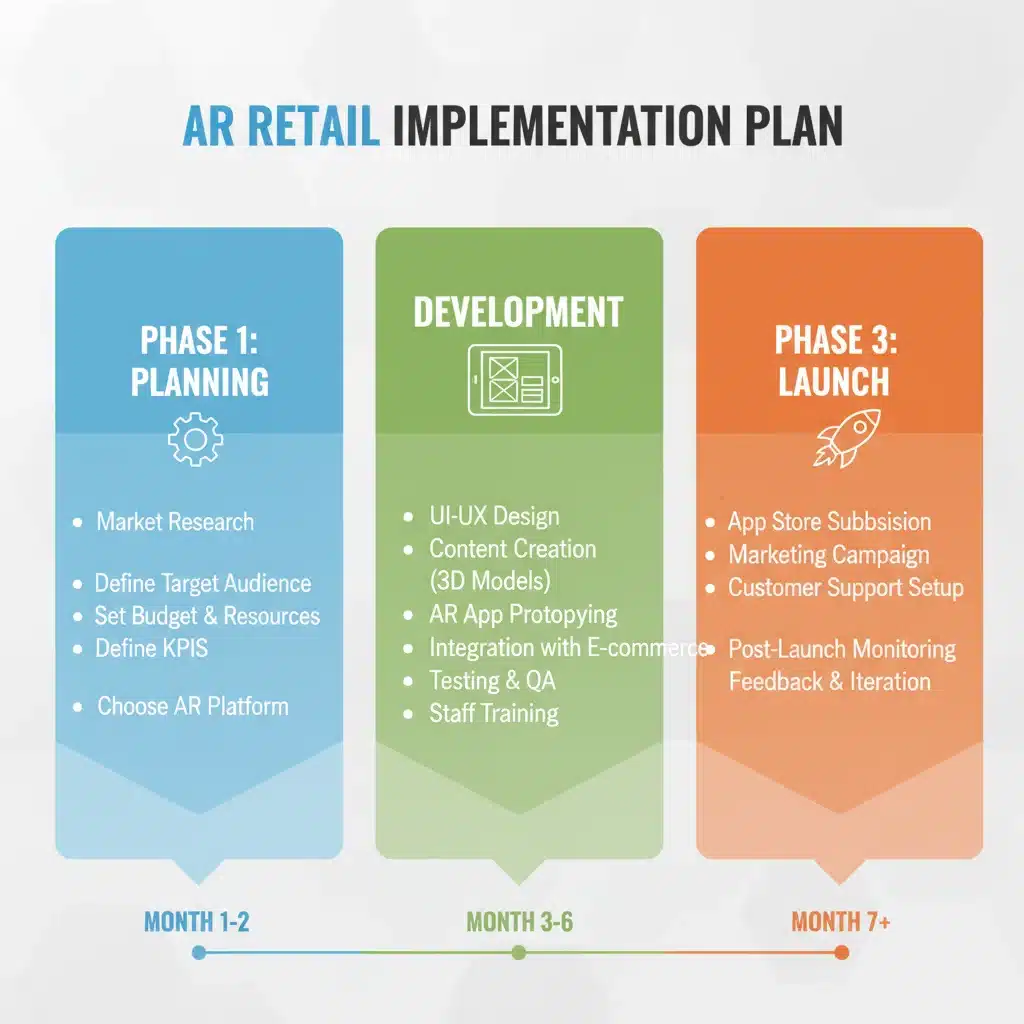
Phase 3: Deployment and Optimization (Month 3)
The final month of your AR Retail Implementation plan is dedicated to launching your AR solution, gathering real-world feedback, and continuously optimizing for maximum impact on customer experience.
Week 9-10: Beta Testing and Staff Training
- External Beta Testing: Release the AR application to a small, diverse group of actual customers (beta testers). This provides invaluable real-world feedback on usability, performance, and the overall impact on their shopping journey. Gather qualitative and quantitative data.
- Feedback Analysis and Final Adjustments: Analyze beta tester feedback meticulously. Prioritize critical bugs and usability issues. Implement final adjustments to the application before the public launch.
- Staff Training: Crucially, train your retail staff on how to use the AR application themselves and, more importantly, how to guide customers through the experience. Staff should be enthusiastic ambassadors for the new technology. Provide clear instructions, FAQs, and troubleshooting tips.
- Marketing and Communication Plan: Develop a compelling marketing strategy to announce and promote your new AR experience. This could include in-store signage, social media campaigns, email marketing, and press releases. Highlight the benefits for the customer.
- Analytics Setup: Ensure all necessary analytics and tracking tools are integrated to monitor usage, engagement, and performance against your defined KPIs from day one.
Week 11-12: Public Launch and Post-Launch Optimization
- Official Launch: Roll out your AR application to the general public. Monitor the launch closely for any unexpected issues.
- Monitor KPIs and User Feedback: Continuously track your defined KPIs. Are you seeing the expected improvements in customer satisfaction, return rates, and engagement? Actively solicit and monitor customer feedback through app reviews, social media, and direct surveys.
- Iterative Optimization: AR is not a ‘set it and forget it’ technology. Based on ongoing data and feedback, continue to refine and optimize the application. This might involve performance improvements, new features, or content updates.
- Marketing Reinforcement: Continue promoting the AR experience. Highlight success stories and positive customer testimonials.
- Future Planning: Begin planning for the next iteration of your AR strategy. What new features could be added? How can AR be expanded to other areas of the business?

Measuring Success: Achieving the 25% CX Boost
The 25% CX boost isn’t just an arbitrary number; it’s a measurable outcome that validates your AR Retail Implementation. To truly understand if you’ve hit this target, consistent monitoring and analysis of your KPIs are essential. Here’s how to approach it:
- Pre- vs. Post-Implementation Comparison: Directly compare your chosen CX metrics (CSAT, NPS, return rates, dwell time) from before the AR launch to the period after. This direct comparison will provide the clearest picture of the impact.
- Qualitative Feedback: Supplement quantitative data with qualitative insights. Conduct customer surveys, focus groups, and analyze social media sentiment. Listen to what customers are saying about their AR experience.
- Engagement Metrics: Track how often customers are using the AR features, which features are most popular, and for how long they engage. High engagement often correlates with a better experience.
- Sales and Conversion Data: Analyze if AR-assisted purchases lead to higher conversion rates or average order values. For example, do customers who virtually try on clothes purchase more items or more expensive items?
- Return Rate Analysis: A significant reduction in returns for products where AR visualization was key is a strong indicator of improved CX and better purchasing decisions.
Remember, a 25% boost in CX is a significant achievement. Celebrate milestones, but also use the data to identify areas for continuous improvement. AR technology is constantly evolving, and so should your strategy.
Overcoming Common Challenges in AR Retail Implementation
While the benefits are clear, AR Retail Implementation comes with its share of challenges. Anticipating these and having a plan to address them is crucial for success.
1. Technical Hurdles:
- 3D Asset Quality: Poor 3D models lead to an unrealistic and unconvincing AR experience. Invest in high-quality 3D scanning or modeling.
- Performance: AR apps can be resource-intensive. Optimize for various devices and network conditions to prevent lag and crashes.
- Platform Fragmentation: Developing for both iOS and Android, plus potentially WebAR, can be complex. Prioritize based on your audience.
- Integration Complexity: Seamlessly connecting AR with existing retail systems can be challenging. Plan for robust APIs and data synchronization.
2. User Adoption and Education:
- Awareness: Customers won’t use AR if they don’t know it exists. Promote your AR features prominently.
- Ease of Use: The AR experience must be intuitive. If it’s too complicated, users will abandon it.
- Staff Training: As mentioned, well-trained staff are critical for guiding customers and troubleshooting.
3. Cost and ROI Justification:
- Initial Investment: AR development can be costly. Clearly define your ROI metrics and track them diligently to justify the investment.
- Maintenance: AR solutions require ongoing updates, content management (new 3D models), and technical support. Factor these into your long-term budget.
4. Data Privacy and Security:
- User Data: Ensure compliance with all relevant data privacy regulations. Be transparent about data collection and usage.
- Secure Transactions: If AR integrates with purchasing, ensure secure payment gateways.
By proactively addressing these challenges, you can mitigate risks and ensure a smoother, more successful AR Retail Implementation.
The Future of AR in Retail and Continuous Innovation
Your 3-month plan is just the beginning of your journey with AR Retail Implementation. The technology is rapidly evolving, and staying ahead means continuous innovation and adaptation. Consider these future trends and opportunities:
- Spatial Computing: As AR hardware (like smart glasses) becomes more sophisticated and widely adopted, AR experiences will become even more seamless and integrated into daily life.
- AI Integration: Combining AR with Artificial Intelligence can lead to hyper-personalized experiences, predictive recommendations, and even more intuitive interactions. Imagine an AR assistant that learns your style preferences and suggests outfits in real-time.
- Metaverse Integration: While still nascent, the concept of the metaverse suggests a future where physical and digital retail spaces blend even further, with AR playing a crucial role in bridging these worlds.
- Advanced Analytics: Sophisticated AR analytics will provide deeper insights into customer behavior, allowing for even more precise optimization of the retail experience.
- Haptic Feedback: Future AR could incorporate tactile sensations, allowing customers to ‘feel’ the texture of a virtual fabric or the weight of a virtual product.
By staying informed about these advancements and regularly evaluating new AR capabilities, you can ensure your retail business remains at the forefront of customer experience innovation. The initial AR Retail Implementation provides a strong foundation, but the real long-term value comes from a commitment to continuous improvement and embracing the next wave of technological possibilities.
Conclusion: Paving the Way for a Superior Shopping Experience with AR
Implementing Augmented Reality in your retail operations is no longer a luxury; it’s becoming a necessity for businesses aiming to thrive in a competitive, experience-driven market. This 3-month AR Retail Implementation plan provides a clear, actionable roadmap to integrate this transformative technology and achieve a remarkable 25% enhancement in customer experience.
From strategic planning and meticulous development to seamless deployment and continuous optimization, every step outlined in this guide is designed to maximize your chances of success. By focusing on solving customer pain points, providing engaging interactions, and consistently measuring your impact, you can unlock the full potential of AR.
The retailers who embrace AR today are not just adopting new technology; they are investing in the future of customer engagement, building stronger brand loyalty, and creating memorable shopping journeys that keep customers coming back. Start your AR journey now, and position your brand as a leader in innovative retail experiences.